
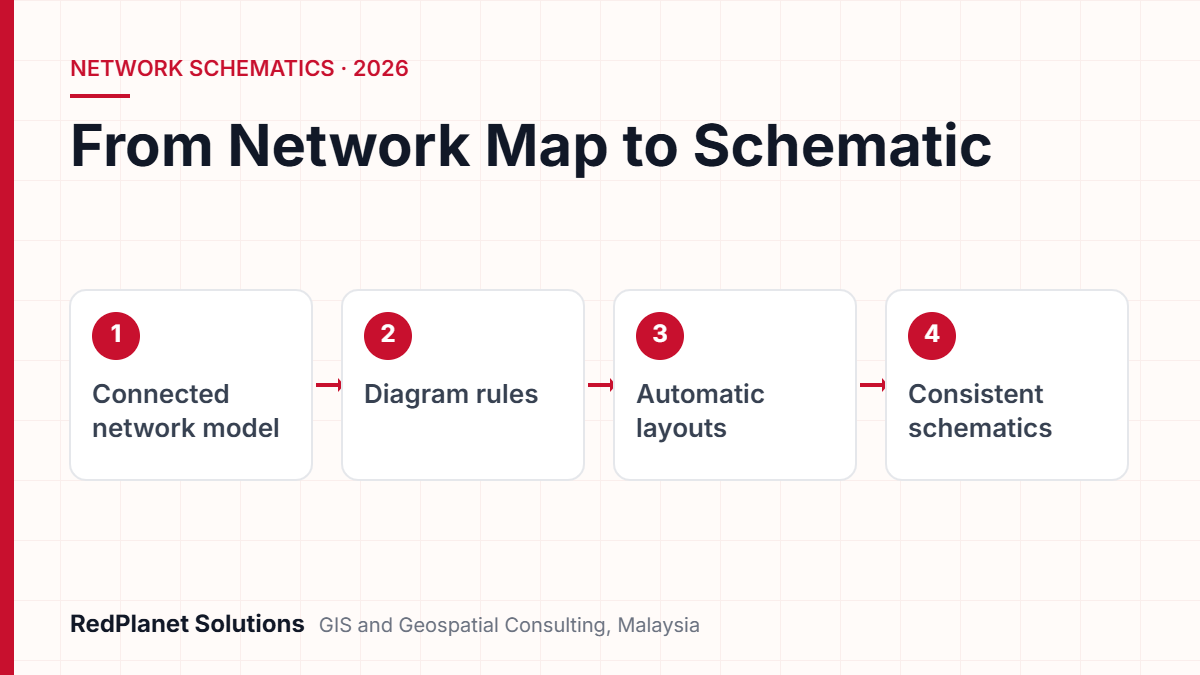
A GIS schematic diagram is a simple, scale-free view of a network. It is built from the connected network model in your GIS, not drawn by hand. To build one, you need clean links between assets, correct phasing and switch states, a diagram template with rules and layouts, and a way to keep each diagram up to date.
- Because a schematic drops map scale, staff can read feeders and switching paths at a glance.
- Also, ArcGIS Utility Network diagrams and GE Vernova Smallworld both build schematics straight from the network model.
- However, good results depend far more on clean links, phasing and switch data than on the layout you pick.
- So treat each schematic as a product of the GIS with a regular check, not as a separate drawing.
- Finally, start with a small pilot, agreed diagram standards and a clear data baseline.
What Is the Difference Between a Geographic View and a Schematic View of a Utility Network?
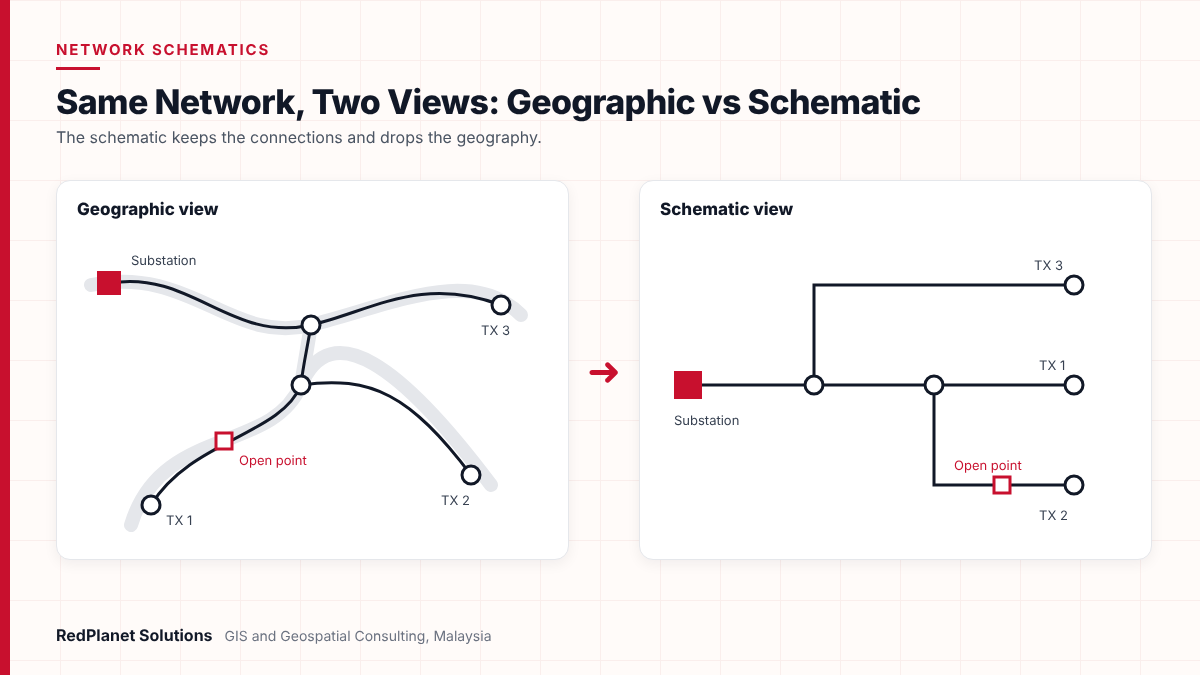
A geographic view puts each asset at its real place on the ground. A schematic view, by contrast, puts each asset where it is easiest to read. Both views come from the same network. However, they answer different questions.
On a map, an 11 kV feeder may wind for miles along roads. As a result, its switches and transformers end up spread across the screen. That suits a field crew looking for a pole. But it is slow for a control engineer who needs the switch that cuts off a fault. So a schematic drops distance and scale. Then it lays out the same equipment so the supply path reads in one direction.
Esri describes schematics as simple network views that show structure and operation without scale limits such as cable length. In short, the schematic keeps the links and drops the geography. For more on how that connected model is built, see our guide to geospatial electric network modelling.
| Aspect | Geographic view | Schematic view |
|---|---|---|
| Position. | Real place. | Logical place. |
| Scale. | True to ground. | No scale. |
| Main users. | Field crews and planners. | Control room and network engineers. |
| Best for. | Finding assets. | Tracing supply and planning switching. |
| Source. | GIS network. | The same GIS network. |
Which Types of Schematic Diagrams Do Utilities Build From GIS?
Most power firms build three main kinds of schematic. These are single line diagrams, feeder schematics and substation views. Also, each one serves a different user and level of detail.
The choice matters because each type needs its own rules. For example, a feeder schematic often folds a whole substation into one symbol. A substation diagram, on the other hand, opens that same box to show busbars, breakers and isolators. So it pays to define your diagram types first. Only then should anyone touch a layout setting.
Single line diagram
It shows a three-phase circuit with one line. As a result, engineers can read the supply path and protection devices fast.
Feeder schematic
It shows one feeder from its source breaker to the last transformer, often as a tree. So it suits fault isolation and load transfer planning.
Substation view
It opens a substation to show busbars, bays and switchgear. In turn, it helps with daily work and maintenance plans.
Network overview
It sums up many feeders in one diagram. Planners use it to see links between areas.
Trace-based diagram
It is built on demand from a trace, such as all assets below one device. For instance, it helps with outage and customer impact checks.
There is also a local rule to note in Malaysia. The Energy Commission’s Grid Code for Sabah and Labuan defines an Operational Diagram. In fact, it calls it a schematic of apparatus and circuits at the connection point. In addition, the code says distribution networks run at 33 kV or below. That is the very range where feeder schematics from GIS do most of their work.
How Does a GIS Build a Schematic Diagram Automatically From a Connected Network?
A GIS builds a schematic by reading the links in the network model. Next, it forms a logical graph and trims it with rules. Then it arranges the result with a layout. So no one draws the lines by hand. Instead, the diagram comes from the data.
Esri splits this into three phases. First, a basic build makes a diagram feature for each input feature. Next, optional rules add, remove or fold content. For example, they can collapse cable joints between two switches. Finally, optional layouts arrange what is left. The input can be a manual selection. It can also be the result of a trace, such as a downstream trace.
- Pick the start. First, select features, a feeder or a trace result on the map.
- Apply a template. Next, choose the template that sets the rules, layouts and symbols.
- Run the rules. Then the rules filter, group or open content, such as substation boxes.
- Run the layouts. After that, tree or schematic layouts arrange the result so it is easy to read.
- Store and maintain. Finally, save the diagram if it must last, and keep it in step with the network.
Because the diagram is derived, it can also drift out of date. Esri tracks this with a consistency status. For instance, a diagram is flagged after edits to the features it uses. It is also flagged after template changes. An Update Diagram tool then brings it back in line. This idea of a derived product that you can check is the key to any schematic programme.
Which GIS Tools Build Utility Network Schematics?
Most power firms use one of two platforms for this work. The first is Esri ArcGIS Utility Network, through its network diagrams. The second is GE Vernova Smallworld. Both build schematics from the connected network model, not from separate drawings.
ArcGIS Utility Network diagrams
In ArcGIS Pro, the utility network and the trace network both include diagrams. Also, default diagram templates are created with the network. Then teams can build their own templates with custom rules and layouts. According to Esri’s network diagrams help, editing diagrams needs the ArcGIS Advanced Editing user type extension. However, since ArcGIS Enterprise 11.5, you no longer need it just to view existing diagrams. For help with set-up, see our Esri ArcGIS services.
GE Vernova Smallworld
Smallworld has built schematics for a long time. In fact, GE announced the Smallworld Schematics Generator in 2003. It turned complex map networks into compact, simple schematics. It also offered orthogonal, circular, hierarchical and symmetrical layouts. Today, GE Vernova says its network product manages the model both on the map and as a schematic. Our GE Smallworld team sets up and supports these systems.
Smallworld GNM is your network system of record.
Build schematics inside Smallworld, so they share one model and one change process.
You are moving to ArcGIS Utility Network.
Design diagram templates during data model design, not after go-live.
Your ADMS or OMS draws its own diagrams.
Focus the GIS on clean links and a stable export. Then agree who owns the layout.
You only need the odd diagram for planning.
Start with trace-based diagrams on demand before you store full diagram sets.
What Data Do You Need Before You Can Build Reliable Schematics?
Your network must be right in electrical terms before it can look right. In practice, that means checked links, phasing, switch states, containers and shared IDs.
Many firms learn this the hard way. GE Vernova notes that old network map data often had few quality rules. As a result, it acted more like a picture than a connected network. So a schematic built from that data shows every gap. For example, a missing link becomes an isolated island. Likewise, a wrong switch state shows a feeder fed from two sources.
Schematic readiness checklist
First, confirm these items on a pilot feeder. Then scale up across the network.
If your data falls short, fix it first through structured GIS QA/QC. Do not tweak layouts to hide the problem. Smallworld users may also like our article on data quality in GE Vernova Smallworld GNM. And where data comes from CAD or older systems, FME workflows can help clean and load it.
Not sure if your network data is ready for schematics? We can check a pilot feeder with you.
Talk To Our Consultants →How Are GIS Schematics Used in Control Rooms, OMS and ADMS?
In the control room, schematics let staff see the scope of a switching job at once. So they do not need to pan or zoom across a map. First, the GIS supplies the as-built network. Then the OMS or ADMS adds live status on top.
Industry writing on GIS and DMS links makes this clear. The GIS is a mostly static model with links between assets. The ADMS, by contrast, is a live model that must be phase-based. Therefore, the ADMS relies on every link and phase in the GIS being right. That article also favours a GIS-first approach. In it, field changes go into the GIS before the asset is switched on. Then they pass to the control system.
Standards help here too. For example, IEC 61968-13 sets a CIM RDF format to exchange distribution models. In addition, IEC 61970-453 sets a diagram layout profile linked to CIM data. So when you plan an ADMS link, decide early what the GIS sends. It may send only the network model, or the layout as well.
At RedPlanet, we see the best schematic as the one nobody has to redraw. When staff trust the GIS model, the diagram becomes a by-product of good data, not a separate drafting job.RedPlanet Solutions
What Are the Most Common Mistakes in Schematic Projects?
Most schematic projects fail on data and ownership, not on software. After all, the layout engine usually works. Instead, the trouble lies in what goes into it and who keeps it current.
Treating schematics as drawings.
Teams hand-edit diagrams heavily. Then they lose those edits or let them drift from the GIS. So keep manual changes small and write them down.
Skipping the data baseline.
Building diagrams before links and phasing are checked gives islands and loops. As a result, users stop trusting them.
No update routine.
Diagrams go stale after network edits. Therefore, give each diagram set an owner and a regular update cycle.
One template for everything.
A feeder, a substation and an overview need different rules. One template, by contrast, gives cluttered or thin results.
Ignoring the end user system.
Your ADMS or OMS may expect set symbols or IDs. So design for that from the start, not at the end.
In addition, watch speed on very large feeders. Diagrams with thousands of items may need rules that group content. They may also need to be split into smaller views. So test your largest feeder early. That way, you find these limits before rollout.
How Should a Utility Plan a GIS Schematic Diagram Project?
Plan the work as a data and process programme with a clear pilot. Do not treat it as a simple software set-up. As a result, a phased plan cuts risk and builds user trust.
Define users and diagram types
First, list who will use schematics and for which choices. Then note the diagram types they need.
Baseline the data
Next, check links, phasing and switch states on a sample pilot area.
Design templates and standards
Then agree symbols, rules and layouts for each diagram type with the control room and engineers.
Pilot and review
After that, build diagrams for a few feeders and one substation. Review them with control staff.
Scale and govern
Finally, roll out by region. Also, set up regular checks and link updates to your network change process.
Is your GIS network still mostly unconnected? Are your switch states unreliable? If so, schematics will not help yet. Instead, fix and model the network data first. Then build diagrams once the model is sound.
For a wider view of GIS in power networks, visit our electric utility GIS services. You can also read about our schematising service. For example, it shows how this work fits into wider network projects.
Frequently Asked Questions
What is a GIS schematic diagram?
A GIS schematic diagram is a simple, scale-free view of a network. It is built from the connected network model in a GIS. It keeps the links between assets but drops map distance. As a result, engineers and control staff can read supply paths, switches and feeders much faster than on a map.
Can I build a single line diagram from GIS?
Yes. Platforms such as ArcGIS Utility Network and GE Vernova Smallworld can build single line style diagrams from network data. However, the result depends on correct links, phasing and switch states. Most firms also set up a separate template. That way, substations and feeder paths show in a clear, steady style.
How do schematics stay up to date when the network changes?
Schematics come from the GIS, so they need a regular check. In ArcGIS, for example, a diagram is flagged after edits to its features or template. Then an Update Diagram tool refreshes it. So give each diagram set an owner. Also link updates to your normal network change process.
Do I need ArcGIS Utility Network to create network diagrams?
In ArcGIS, network diagrams come with the utility network and the trace network. Editing needs the ArcGIS Advanced Editing user type extension. However, from ArcGIS Enterprise 11.5 you no longer need it just to view existing diagrams. Smallworld users, by contrast, can build schematics inside their current Smallworld system.
Why do my schematics look cluttered or wrong?
Messy schematics usually point to data issues, not layout issues. For example, links may be missing, switch states may be wrong or phasing may be absent. Also, one template for every diagram type can cause clutter. So fix the data first. Then tune rules and layouts for each diagram type.
How long does a schematic project take?
It depends on network size, data quality and the number of diagram types. A pilot on a few feeders can show results quickly. Full rollout, however, follows the pace of data fixes. Our schematising service starts with a readiness check, so you can plan with real numbers.
Is Building Schematics From GIS Worth It for Your Utility?
For most power firms, yes, as long as the network model is connected and well run. Building schematics from GIS removes double drafting. In addition, it gives staff a view that matches the as-built network.
First, the software side is mature. Both ArcGIS Utility Network diagrams and Smallworld can build feeder, substation and trace-based schematics from one model. However, the real work lies in links, phasing, templates and regular updates. So start with a small pilot and prove the data. Then scale up. If you want a second view on your readiness, get in touch with our team.
Expert Guides
Related GIS Guides
 GuideGE Smallworld Migration Planning: Moving to a Modern Utility Network ModelPlan a Smallworld migration with confidence: upgrade or replatform options, data model mapping, FME, integration testing, cutover steps and key risks.Read the guide →
 GuideHow Electric Utilities Use Network-Based GIS to Cut OutagesA practical guide to how network-based GIS, FLISR, AMI and connected network models help electric utilities reduce outage frequency, duration and cost.Read the guide →
Ready to Build Schematics From Your GIS?
RedPlanet Solutions helps power firms prepare network data, design diagram templates and build sound schematics in Smallworld and ArcGIS. Talk to us about a pilot on your own feeders.
Talk To Our GIS Consultants
PK Senthilkumar is CEO of RedPlanet Solutions. His work focuses on GIS consulting, network-based GIS for utilities, enterprise GIS modernisation and practical spatial decision-making for organisations operating across Malaysia, India, Australia and international markets.
About RedPlanet Solutions
RedPlanet Solutions (M) Sdn Bhd is a Malaysia-based GIS consulting and geospatial services company and part of RedPlanet Berhad. The company delivers GIS for electric utilities, spatial data collection, drone surveying, mobile mapping and GIS software development to utilities, government agencies, smart cities and private sector organisations across Southeast Asia, the Middle East, Australia and beyond. RedPlanet works across leading commercial and open-source GIS ecosystems, including GE Vernova Smallworld, Esri, Hexagon, SuperMap, QGIS, GeoServer and FME.