
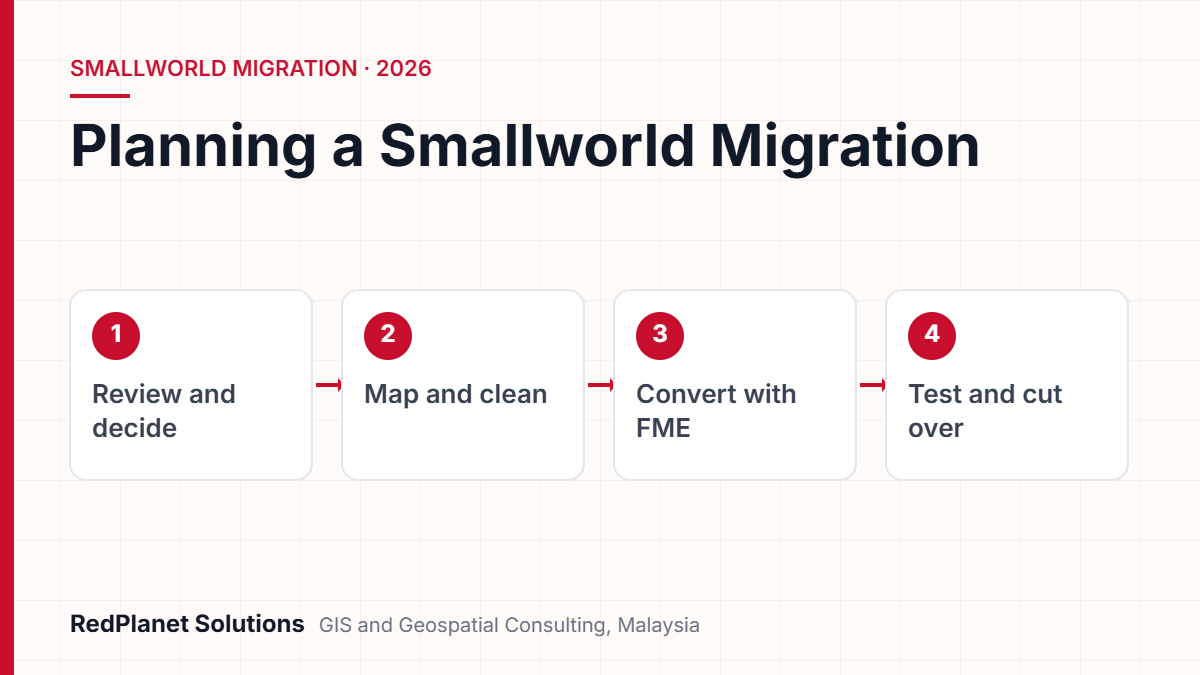
A Smallworld migration moves a utility’s network model to a current GE Vernova Smallworld GNM release or to another GIS. However, the software choice matters less than four tasks. First, agree the target data model. Next, clean the source data. Then automate the loads with FME. Finally, test links to OMS, ADMS, SAP and SCADA before cutover.
- Most Smallworld migrations start because of old releases, cloud plans, link pressure or a need for specialised Magik skills.
- An upgrade to a current Smallworld GNM release keeps the network logic, but a platform change resets the model and every link.
- Also, in most projects, data model mapping and data cleansing take more effort than the software install.
- Because FME can read and write Smallworld data, the same workspaces can run for every trial load and the final cutover.
- Finally, parallel running and early link tests are the best guard against a failed go-live.
Why do utilities start a Smallworld migration?
Utilities start a Smallworld migration when the current system no longer fits their plans. In most cases, the network model is still sound. But the platform around it needs work.
Smallworld has a long record in network GIS for electric, gas, water and telecom firms. Today, GE Vernova positions GE Vernova Smallworld GNM (Geo Network Management) as the system of record that feeds its GridOS tools, such as ADMS and DERMS. However, many firms still run old releases with heavy custom code. So the gap to the current product grows each year.
Old releases
Old releases drift away from supported database and security baselines. So each skipped release makes the next upgrade larger.
Cloud and hosting
GE Vernova says Smallworld GNM can run on public cloud such as AWS, Azure and Google Cloud. So many firms want to leave ageing servers behind.
Link pressure
ADMS, outage tools, SAP and SCADA all need a clean, connected model. But old point to point links become fragile and costly.
Skills and support
Smallworld was first built on the Magik language. Because Magik skills are specialised, heavy custom code gets riskier to keep.
In addition, grid change adds a further push. For example, Malaysia’s National Energy Transition Roadmap targets 70 percent of generation capacity from renewable sources by 2050. Therefore, network models must now hold far more rooftop solar, storage and EV charging.
Should you upgrade Smallworld in place or move to another platform?
For most Smallworld users, an upgrade to a current Smallworld GNM release is the lower risk path. A move to another platform makes sense only if a clear business reason justifies it. For instance, a group-wide GIS standard may require it.
GE Vernova has now launched Smallworld GNM 6.0. In particular, it says the release improves cyber readiness, usability and GridOS links. It also adds VMDS Cloud with PostgreSQL as part of a cloud path. As a result, staying on Smallworld no longer means staying on old servers.
| Factor | Upgrade to Smallworld GNM | Move to another GIS |
|---|---|---|
| Network model | Kept. | Rebuilt and remapped. |
| Custom code | Reviewed and trimmed. | Rebuilt in full. |
| System links | Updated and retested. | Redesigned and rebuilt. |
| Users | Familiar ideas, new screens. | New tools and training. |
| Main risk | Old technical debt. | Lost network logic. |
Your model is sound, but the release is old.
Upgrade to a current Smallworld GNM release and drop unneeded custom code.
You run Electric Office with heavy custom code.
Upgrade, but move custom code back towards standard product behaviour.
Your group has set one enterprise GIS for all units.
Plan a full platform move with its own data model and link stream.
Your data quality is poor on any platform.
Clean the data first, then decide the platform.
First, a new platform rarely fixes poor data. If broken links, duplicate assets and gaps exist today, they will move with you. So plan cleansing as its own phase. Also, an upgrade will not fix a process that nobody follows.
How do you map a Smallworld data model to the target model?
Data model mapping says where every piece of source data will land in the target. In short, it is the key design document in a Smallworld migration. That is because every load, test and report depends on it.
Notably, Smallworld products such as Electric Office, Gas Distribution Office, Water Office and Global Transmission Office each have their own object models. In addition, most firms have extended these models over the years. So first, the team must record the model as it is built, not the vendor default.
What should a mapping spec cover?
- Object classes: each source feature type and its target match, including ones you will retire.
- Fields and value lists: names, data types, allowed values and default rules.
- Geometry: points, lines, areas, internal worlds and any schematic or text geometry.
- Network links: how terminals, manifolds and switch states turn into target topology, since ADMS depends on them.
- Relationships: ownership, containment and keys to other systems, for example SAP equipment numbers.
Next, agree the target model with the people who use it. For an electric firm, that means planners, field crews and control room staff, not just the GIS team. Also, if the target will share network models with ADMS, align the mapping with IEC 61968-13. That standard defines profiles for sharing network models in a utility. Our guide to geospatial electric network modelling explains why connections matter so much here.
Why should data cleansing happen before the migration?
Cleaning data before you move it is cheaper and safer than fixing it later. If bad data reaches the target, it spreads into ADMS, SAP and outage tools. Then every fix needs work across several systems.
First, run a profiling pass. In particular, it should count network breaks, orphan assets, duplicates, bad values and geometry errors. Then rank each issue by its effect on daily work. For instance, a broken feeder trace matters far more than a missing paint colour. Our article on data quality in GE Vernova Smallworld GNM covers common problem types.
Fix at source
First, correct errors in Smallworld before you extract. That way, source and target stay in step during the parallel run.
Script each rule
Turn every check into a script, so it runs on each trial load, not just once.
Agree pass marks
Set clear pass marks, such as zero feeders without a source, before the first trial load starts.
However, some fixes need field proof. For example, missing transformer ratings or cable sizes may need a site visit. So plan that work early, because field work takes longer than desk edits. Independent GIS QA/QC checks also help, since the people who built the data are not always best placed to test it.
How does FME support a Smallworld migration?
FME lets a team build the extract, transform and load logic once and then rerun it for every trial and the final cutover. That repeat process is what keeps a large Smallworld migration under control.
Safe Software documentation lists a Smallworld 4/5 format in FME that both reads and writes data. But Safe notes that GE Smallworld and Spatial Business Systems build this reader and writer, not Safe itself. Also, it connects through an FME service that runs inside a Smallworld session.
- Extract source objects and network links from the Smallworld datastore first.
- Transform fields, values, geometry and topology as the mapping spec says.
- Validate the output with scripted checks for counts, links and gaps.
- Load into the target, then print match reports for sign-off.
- Repeat the full chain for each trial load so that results become stable.
As an authorised FME partner, RedPlanet builds these workspaces through our FME services and wider GIS data migration work. However, version fit between FME and Smallworld is easy to miss. So check it at the design stage, not at the first load.
Which integrations need the most attention during a Smallworld migration?
Outage, ADMS, SAP and SCADA links need the most care, because each one needs a correct and complete network model. In fact, a GIS that looks right on screen can still break an outage call or a work order if one ID changes.
| Link | What it uses | Key check |
|---|---|---|
| OMS and ADMS | Network, switch states, customers. | Traces match on sample feeders. |
| SAP | Asset IDs and attributes. | Each asset keeps its SAP record. |
| SCADA | Device IDs and places. | Device names match one to one. |
| Billing | Service points. | Customer counts match per transformer. |
GE Vernova says Smallworld Electric Office helps close the old gap between GIS and ADMS without replacing existing systems. But that gain only holds if you retest each link end to end after the upgrade. Therefore, build a link test suite early and run it on every trial load.
In our experience, the GIS is rarely the hardest part of a Smallworld migration. Instead, the hard part is proving that every downstream system still gets exactly what it expects.RedPlanet Solutions
Also, customer data needs extra care. In Malaysia, changes to the Personal Data Protection Act took effect in stages during 2025. In particular, these include breach notice rules and new guidance on sending data abroad. So if your move involves cloud hosting or offshore work on customer records, check the data flows with your legal team.
Planning an upgrade or move of your Smallworld network model? Our consultants can review your options.
Talk To Our Consultants →How should testing, parallel running and cutover work?
Testing should prove three things before go-live. The data is complete, the network is connected, and each user and system can do its job. Then a parallel run confirms this under real load, and cutover follows a rehearsed plan.
First, run several trial loads, each with a full match report. Next, compare feature counts, totals and trace results between source and target. Then ask business users to run normal tasks in the new system. For example, they might design a new connection or isolate a fault.
Smallworld migration readiness checklist
Use these checks before you approve cutover.
First, set a short edit freeze in the old system for cutover. Then run the final FME load, check the results and switch the links to the new system. Finally, keep the old system read-only for an agreed period. That way, users can check history if questions arise.
What timeline phases and risks should a Smallworld migration plan include?
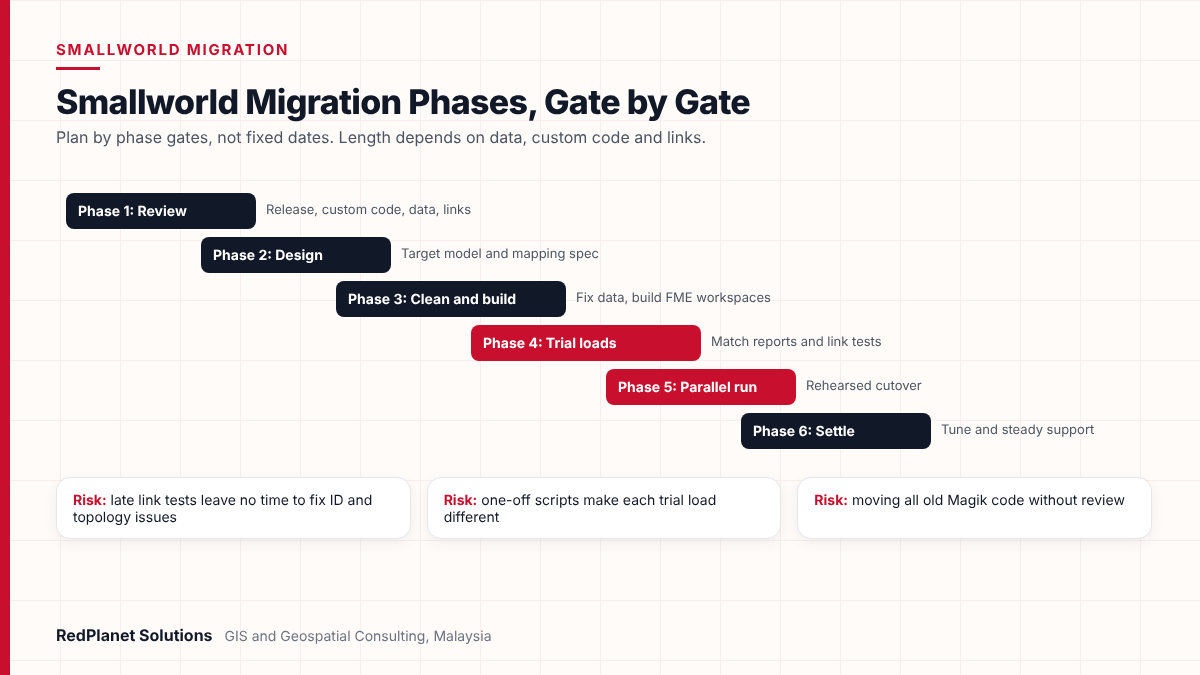
A Smallworld migration usually moves through six phases, from review to support after go-live. However, length depends on data volume, custom code and the number of links. So plan by phase gates, not fixed dates.
Review
First, review the release, custom code, data quality and links. Then choose an upgrade or a platform move.
Design
Agree the target model, the mapping spec, the link design and the pass marks.
Clean and build
Next, fix key data issues and build FME workspaces. Also, trim or rewrite custom code.
Trial loads
Run repeat loads with match reports, link tests and user tests.
Parallel run and cutover
Run both systems for a set period, then carry out the rehearsed cutover.
Settle and support
Fix early issues, tune speed and move to steady support.
Treating it as an IT job
Network owners and field staff must shape the target design, not just approve it at the end.
Moving all custom code
Old Magik code often copies features now in the standard product, so review each item before you rebuild it.
One-off scripts
Manual scripts make each trial load different, but repeatable FME flows keep results comparable.
Late link tests
If you test links only in the final weeks, ID and topology issues appear when there is no time left.
No plan after go-live
Without support, data quality decays again. Our article on maintenance support for Smallworld GNM explains why.
Also, budget for training, because users who learnt Smallworld years ago will meet new screens. In addition, admins will meet new hosting and database options. For more on GIS in this sector, see our electric utility GIS page.
Frequently Asked Questions
What is a Smallworld migration?
A Smallworld migration moves a utility’s GIS network model from an older GE Smallworld system to a newer one. For instance, that can mean an upgrade to a current Smallworld GNM release. Or it can mean a move to another GIS. Either way, it covers data model mapping, data cleansing, conversion, link testing and cutover, not just a software install.
Is it better to upgrade Smallworld or move to another GIS?
If your network model is sound and your links work, an upgrade to a current Smallworld GNM release carries less risk. However, a platform move resets the data model, custom code and every link. So it suits firms with a set enterprise GIS standard or other strong reasons. It also needs a larger budget for design and testing.
Can FME read and write Smallworld data?
Yes. Safe Software lists a Smallworld 4/5 format in FME that reads and writes data. However, GE Smallworld and Spatial Business Systems build the translator, not Safe. Also, FME 2022 and later need a 64-bit version. Our FME team can check the fit for your release before design starts.
How long does a Smallworld migration take?
It depends on data volume, the amount of custom Magik code, the number of links and current data quality. So a small upgrade with little custom code moves faster than a full platform move for a large utility. Plan by phase gates, such as review, design, trial loads and parallel run, rather than a fixed date.
Can Smallworld GNM run in the cloud?
Yes. GE Vernova says Smallworld GNM solutions can run on public cloud, and it names AWS, Google Cloud Platform and Microsoft Azure as examples. It also lists VMDS Cloud with PostgreSQL as part of the cloud path for Smallworld GNM 6.0. However, check hosting and data residency needs against local rules before you decide.
What are the biggest risks in a Smallworld migration?
The biggest risks are moving poor data without cleansing, losing network links during conversion, and breaking feeds to OMS, ADMS, SAP or SCADA. In addition, carrying old custom code forward is another common risk. But repeatable FME loads, early link tests and a rehearsed cutover plan cut these risks a great deal.
What is the safest way to plan a Smallworld migration?
The safest Smallworld migration starts with an honest review and a clear choice. If your network model works, a current Smallworld GNM release is usually the lower risk route. A platform move can still be right, but only with its own model and link stream.
Either way, the same steps apply. First, agree the target data model. Next, clean the data before you move it. Then automate the loads with FME so each run is the same. Finally, test links early, run in parallel and cut over to a rehearsed plan. As a result, your field, asset and control room teams get a model they can trust from day one.
Plan Your Smallworld Migration With Experienced Utility GIS Consultants
RedPlanet Solutions helps utilities review Smallworld systems, map and clean network data, build repeatable FME loads and test links before cutover. Talk to us about your upgrade or platform options.
Talk To Our GIS Consultants
PK Senthilkumar is CEO of RedPlanet Solutions. His work focuses on GIS consulting, network-based GIS for utilities, enterprise GIS modernisation and practical spatial decision-making for organisations operating across Malaysia, India, Australia and international markets.
About RedPlanet Solutions
RedPlanet Solutions (M) Sdn Bhd is a Malaysia-based GIS consulting and geospatial services company and part of RedPlanet Berhad. The company delivers GIS for electric utilities, spatial data collection, drone surveying, mobile mapping and GIS software development to utilities, government agencies, smart cities and private sector organisations across Southeast Asia, the Middle East, Australia and beyond. RedPlanet works across leading commercial and open-source GIS ecosystems, including GE Vernova Smallworld, Esri, Hexagon, SuperMap, QGIS, GeoServer and FME.