
FME is a data tool from Safe Software. First, it reads data from one system. Then it changes the data and writes it to another system. GIS teams build these flows in FME Form, and then they run them in FME Flow. Typical jobs include CAD to GIS, Smallworld or Esri moves, checks and scheduled syncs.
- FME is spatial ETL software from Safe Software, so it can read, change and load data across many formats.
- You build flows in FME Workbench inside FME Form, and then FME Flow runs them on a schedule or event.
- Every flow uses readers, transformers and writers, so you can rerun the same logic many times.
- A sound FME GIS data migration moves in steps, from profiling first to handover last.
- Most problems come from poor profiling and late checks rather than from the tool itself.
What Is FME and What Does It Do for GIS Teams?
FME is a data tool built by Safe Software. First, it reads data from a source. Then it changes the shape or structure of that data, and finally it writes the result to a target. Because it understands maps and coordinates, GIS teams often call it a spatial ETL tool, short for extract, transform and load.
The name first stood for Feature Manipulation Engine. Safe Software was started in 1993 by Don Murray and Dale Lutz. Since then, FME has grown well beyond GIS. Still, its roots show, because it handles coordinate systems, topology and geometry types that most ETL tools ignore.
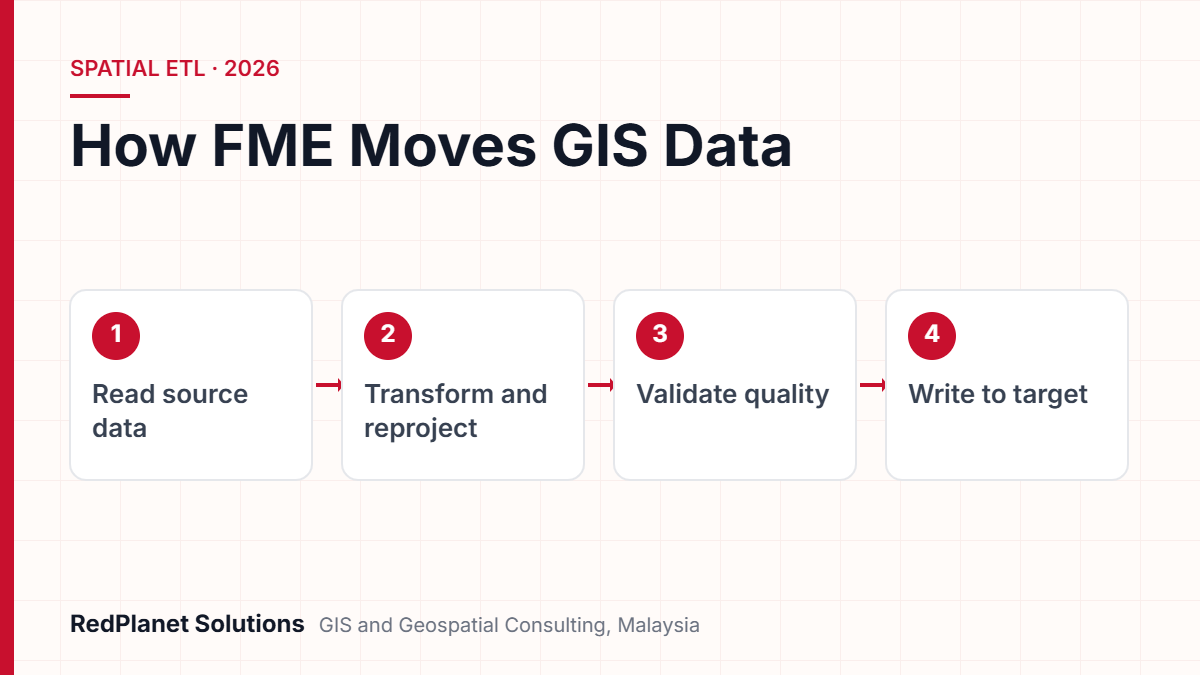
In practice, FME sits between systems that were never built to talk to each other. For example, a utility may keep its network in GE Vernova Smallworld, its assets in SAP and its designs in AutoCAD. So FME can read all three, match them up and then write one clean dataset to Esri ArcGIS. That is also why FME sits at the heart of our FME services.
What Are FME Form, FME Workbench and FME Flow Today?
In short, FME Form is where you build flows, and FME Flow is where they run. Safe Software brought in these names in a 2023 rebrand. So older documents and job adverts may still say FME Desktop and FME Server.
FME Form has three apps: FME Workbench, FME Data Inspector and FME Quick Translator, as the official FME terminology pages explain. First, Workbench is the canvas where you design flows. Next, Data Inspector lets you view data before and after a run. Finally, Quick Translator handles simple format changes with little setup.
| Current name | Former name | What it does |
|---|---|---|
| FME Form | FME Desktop | You build and test flows here. |
| FME Workbench | Same name | This is the canvas inside FME Form. |
| FME Flow | FME Server | It runs flows on a schedule, on events or in real time. |
| FME Flow Hosted | FME Cloud | Safe Software hosts it, so you pay only for what you use. |
FME Flow then takes over. It runs the flows you build in Form, either on a schedule, when an event fires or in real time. It can also send alerts and let other staff request data for themselves. As a result, a one-off job built by an analyst can become a nightly sync without a rewrite.
How Do FME Readers, Writers and Transformers Work Together?
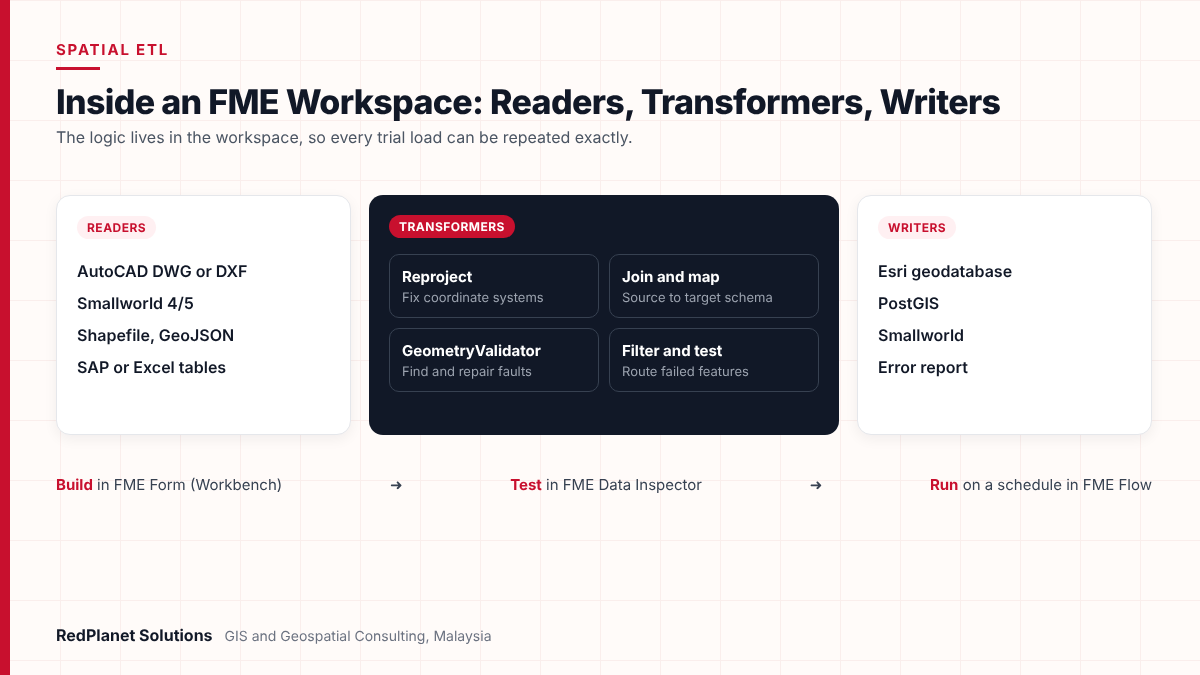
Every FME flow follows one pattern. First, a reader pulls data in. Then transformers change it, and finally a writer sends it out. The saved design is called a workspace, so you can reuse it as often as you like.
Each item that moves through a workspace is a feature. For example, a feature might be a pole, a pipe or a land parcel, with its shape and its fields. Transformers then act on these features one step at a time.
Readers
A reader reads one format, for example a DWG drawing, a shapefile or a Smallworld database.
Transformers
Each transformer does one task, so you chain them to filter, join, reproject or check data.
Writers
A writer sends data to one target, for instance an Esri geodatabase or a PostGIS database.
Workspaces
The workspace records the logic, so another analyst can open it and see each step.
This model matters for migrations. Because the logic lives in a workspace, you can run it on test data, fix a fault and then run it again. So every trial load is repeatable, which is hard to achieve with manual exports or one-off scripts.
What Do GIS Teams Use FME For Most Often?
Most GIS teams use FME for five kinds of work. In fact, many projects mix several of them, so it helps to see each one on its own.
- Format conversion: you turn shapefiles, KML, GeoJSON or spreadsheets into the format your GIS needs, and the fields still line up.
- CAD to GIS: FME reads AutoCAD DWG or DXF layers and blocks, and then it turns them into proper GIS features.
- Smallworld and Esri moves: you shift network data between GE Vernova Smallworld and Esri ArcGIS, or you upgrade within one platform.
- Validation: FME checks shapes, fields and links against your rules before data goes live.
- Scheduled syncs: FME Flow keeps GIS in step with SAP, IBM Maximo or SCADA, so each system stays current.
For Smallworld, Safe Software documents a Smallworld 4/5 reader and writer. FME connects through a Smallworld FME connection service, but you get the translator from GE support or a Smallworld reseller, as the Smallworld reader and writer guide explains.
On the Esri side, the ArcGIS Data Interoperability extension also uses Safe Software’s FME technology inside ArcGIS Pro, according to the Esri documentation. So teams that work across both platforms often find FME is the common thread. We see this daily in our Smallworld and Esri work.
FME is not always the answer. If you only need to export one layer once, then the tools in your GIS are usually enough. But FME pays off when data must be reshaped, checked or moved often, or when several systems are involved.
How Does an FME GIS Data Migration Run, Step by Step?
An FME GIS data migration usually runs in seven stages. However, the time each stage takes depends on data volume, data quality and the number of systems. So treat the stages as a sequence rather than a fixed calendar.
The key idea is to repeat. First, you build the workspace early. Then you run it on real data many times and improve it after each trial load. In addition, each run gives the business evidence it can review before go-live.
Discovery and profiling
First, list the source systems, classes, record counts and known issues. Then profile the data in FME Data Inspector so you see what is really there.
Schema mapping
Next, map each source class and field to the target model. Also agree domain values, coordinate systems and how links get rebuilt.
Prototype workspace
Then build an FME workspace for a small sample area. So you test shapes, fields and links before you scale up.
Trial loads
Run full trial loads into a test system. If a feature fails, log it and fix the cause in the workspace or at source.
Validation and sign-off
Match counts, run rule checks and then let business users test real tasks in the target system.
Cutover
Freeze source edits, then run the final load, apply late changes and move users across.
Handover and automation
Finally, publish ongoing syncs to FME Flow, document each workspace and train the team that will run them.
If you are planning a Smallworld, Esri or CAD migration, we can review your scope.
Talk To Our Consultants →For instance, on a new enterprise GIS for an Indian electric utility, FME handled the first import while the wider programme linked SAP and SCADA. Our projects also follow this sequence, as you can see on our data migration services page.
How Should You Validate Data After an FME Migration?
Check in layers: counts first, then shapes, then fields, then network links, and finally real tasks. Each layer catches faults that the one before it misses.
FME helps with much of this. For example, the GeometryValidator transformer finds faults such as self-intersections and duplicate points, and it can also repair them. Other transformers compare datasets and write failed features to an error report. However, automated checks only cover the rules you set, so business review still matters.
FME migration QA checklist
Run these checks on every trial load, not just the final one, because late faults cost more.
Coordinates need extra care in Malaysia. Older datasets may use local legacy projections, while JUPEM has set up GDM2020, a datum aligned to ITRF2014. So confirm the source and target systems before the first trial load. Then check sample points against known control, which is a standard step for our GIS QA/QC team.
What Mistakes Slow Down FME Migration Projects?
Most FME projects stall because of data and planning faults, not because of the software. In fact, the same five mistakes appear again and again.
Skipping data profiling
Teams assume they know the source data. Then trial loads expose nulls, duplicates and broken links that should have shown up in week one.
Mapping schemas on paper only
A spreadsheet map looks complete until real data runs through it. So build a sample workspace early and test the map there.
Leaving QA to the end
If checks run only before cutover, there is no time to fix root causes. Instead, run checks on every trial load.
One giant workspace
A workspace with hundreds of transformers is hard to debug. Rather, split the logic into smaller workspaces with clear notes.
No plan for ongoing syncs
After cutover, data still needs to flow between systems. So plan FME Flow jobs and owners before the project closes.
Also, watch for data that needs fixing at source. Sometimes it is faster to clean data during the move. But if the source system stays live, then errors will return unless you fix them there too. We cover this in our article on data quality in GE Vernova Smallworld GNM.
When Should a GIS Team Bring In an FME Partner?
Bring in a partner if the migration is large, the data model is complex or your team has never run a live cutover. But for small, repeat conversions, a trained in-house analyst is often enough.
You convert a few files a month, so the formats are common
Train an in-house analyst on FME Form.
You are moving a utility network between Smallworld and Esri
Work with an FME partner who knows both data models.
You need nightly syncs between GIS, SAP and asset systems
Partner to design FME Flow jobs, and then take them over.
RedPlanet Solutions is an authorised FME partner. We work with Smallworld, Esri, Hexagon and open-source platforms, so we can map between them without favouring one vendor. In addition, we understand network links well, because so much of our work is for electric utilities.
At RedPlanet, we find the tool is rarely the hard part of a migration. Instead, the real work is to learn what the data means to the people who use it. Then we prove it still means the same thing after the move.RedPlanet Solutions
Profile before you build
First, know what is in the source data, and then design the target map.
Repeat every run
Keep logic in workspaces so you can repeat each trial load exactly.
Hand over cleanly
Document workspaces and train your team, so syncs keep running after go-live.
Frequently Asked Questions
What is FME used for in GIS?
FME is used to convert, reshape, check and move spatial data between systems. For example, GIS teams use it for CAD to GIS work, Smallworld and Esri migrations, geometry checks and scheduled syncs with SAP or asset systems. Also, it works through visual flows, so most users never write code.
Is FME Workbench the same as FME Form?
Not quite. In short, FME Form is the authoring product that was once called FME Desktop. Workbench is one of its three apps, along with FME Data Inspector and FME Quick Translator. So you design and run your workspaces in Workbench, while Form is the wider package around it.
What is the difference between FME Form and FME Flow?
You build and test flows in FME Form on a desktop. Then FME Flow, once called FME Server, runs those flows on a schedule, when an event fires or in real time. So many teams author in Form and then publish to Flow for daily use.
Can FME migrate data from GE Smallworld?
Yes. Safe Software documents a Smallworld 4/5 reader and writer that links through a Smallworld FME connection service. However, you get the translator from GE support or a Smallworld reseller. Also, network data still needs careful mapping and link checks after the move.
How long does an FME GIS data migration take?
It depends on data volume, quality and the number of systems. For instance, a simple format change may take days, while a utility migration can run for months. So profiling the source data early gives the best estimate. Our data migration services page shows how we scope projects.
Do I need programming skills to use FME?
No, because most FME work is visual: you connect readers, transformers and writers on a canvas. However, complex projects need analysts who know data models, coordinate systems and SQL. Python can also help with edge cases, but many flows never need it.
Is FME the Right Tool for Your Next GIS Migration?
FME is a strong choice when data must move between systems, change shape on the way and pass clear checks. FME Form lets you design and test that logic, and then FME Flow keeps it running once the project ends.
However, success depends on method more than software. So profile early, map with real data, check every trial load and plan the syncs that follow cutover. Also, we can help with related GIS data processing. If you want help to scope an FME GIS data migration, then get in touch with our team.
Expert Guides
Related GIS Guides
 GuideGE Smallworld Migration Planning: Moving to a Modern Utility Network ModelPlan a Smallworld migration with confidence: upgrade or replatform options, data model mapping, FME, integration testing, cutover steps and key risks.Read the guide →
 GuideGIS Data Quality Checklist for Utilities: What to Test Before You Accept a DeliverableA GIS data quality checklist for utilities: acceptance criteria, sampling, topology checks, attribute domains and positional accuracy before sign-off.Read the guide →
Plan Your FME GIS Data Migration With an Authorised FME Partner
RedPlanet Solutions designs and runs FME flows for utilities, government and enterprise GIS teams in Malaysia and the region. So tell us about your source systems, and then we will outline a clear migration and QA plan.
Talk To Our GIS Consultants
PK Senthilkumar is CEO of RedPlanet Solutions. His work focuses on GIS consulting, network-based GIS for utilities, enterprise GIS modernisation and practical spatial decision-making for organisations operating across Malaysia, India, Australia and international markets.
About RedPlanet Solutions
RedPlanet Solutions (M) Sdn Bhd is a Malaysia-based GIS consulting and geospatial services company and part of RedPlanet Berhad. The company delivers GIS for electric utilities, spatial data collection, drone surveying, mobile mapping and GIS software development to utilities, government agencies, smart cities and private sector organisations across Southeast Asia, the Middle East, Australia and beyond. RedPlanet works across leading commercial and open-source GIS ecosystems, including GE Vernova Smallworld, Esri, Hexagon, SuperMap, QGIS, GeoServer and FME.